Fixed some issues。
{{currentItem.description}}
Release Date:{{currentItem.release_date}}
All
Prod Recommended Version
Technical Preview Version
Latest
{{item.year}}
{{iitem.product_version}}

ZStack Cloud 5.5.6

Highlights

  • Instance-Cluster Binding Mechanism Optimization: Supports enabling Instance-Cluster Binding at the cluster level, simplifies binding logic, and enhances resource scheduling and operational convenience.
  • Supports Ceph Block Storage Volume as Elastic Baremetal System Volume: Improves system volume storage performance and avoids single points of failure through multi-path mechanisms, ensuring business continuity.
  • Supports Elastic Baremetal Instance Backup: Supports creating backups for elastic baremetal system volumes (block storage volumes) and data volumes, with one-click recovery to provide security for business data.

Overview

VM Instance
  1. Instance-cluster binding mechanism optimization.
  2. VNC console supports full-screen mode and small-dot cursor.
Cloud Network
  1. Supports specifying port for LB listener forwarding rule.
Elastic Baremetal Management
  1. Supports Ceph block storage volume as elastic baremetal system volume.
  2. Supports elastic baremetal instance backup.
Operational Management
  1. Billing management supports more currency types.
Platform Maintenance
  1. Login page title can contain more characters.

Instance-Cluster Binding Mechanism Optimization

ZStack Cloud 5.5.6 optimizes the instance-cluster binding mechanism.

Supports Enabling Instance-Cluster Binding at the Cluster Level

On the cluster details page, choose Advanced Settings and enable Instance-Cluster Binding. Then, all new instances created in this cluster inherit this configuration by default. Based on the Instance Binding Policy, they must or are prioritized to start in this cluster. Affected instance types include: VM instances, VPC vRouters, load balancer instances, advanced monitoring servers, and SDN instances.
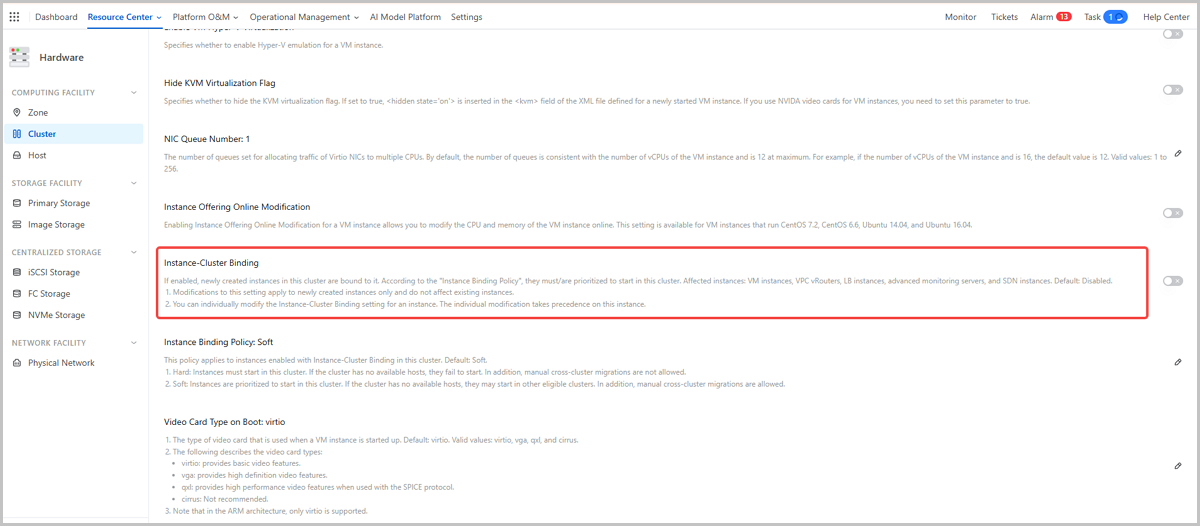
You can also enable or disable Instance-Cluster Binding for individual instances. Once individually enabled or disabled with this switch, the instance is not affected by this cluster setting.
Figure 1. Cluster Setting: Instance-Cluster Binding


Binding Policy Optimization

ZStack Cloud 5.5.6 optimizes the complex instance-cluster binding logic. After optimization, two instance-cluster binding policies are supported.

  • Hard: Instances must start in the current cluster. If no available hosts exist in the current cluster, startup fails. Also, manual migration to other clusters is not allowed.
  • Soft : Instances are prioritized to start in the current cluster. If no available hosts exist in the current cluster, instances can start in other clusters. Also, manual migration to other clusters is allowed.

You can set Instance Binding Policy in Advanced Settings on the cluster details page. This policy applies to all instances with Instance-Cluster Binding enabled in this cluster.
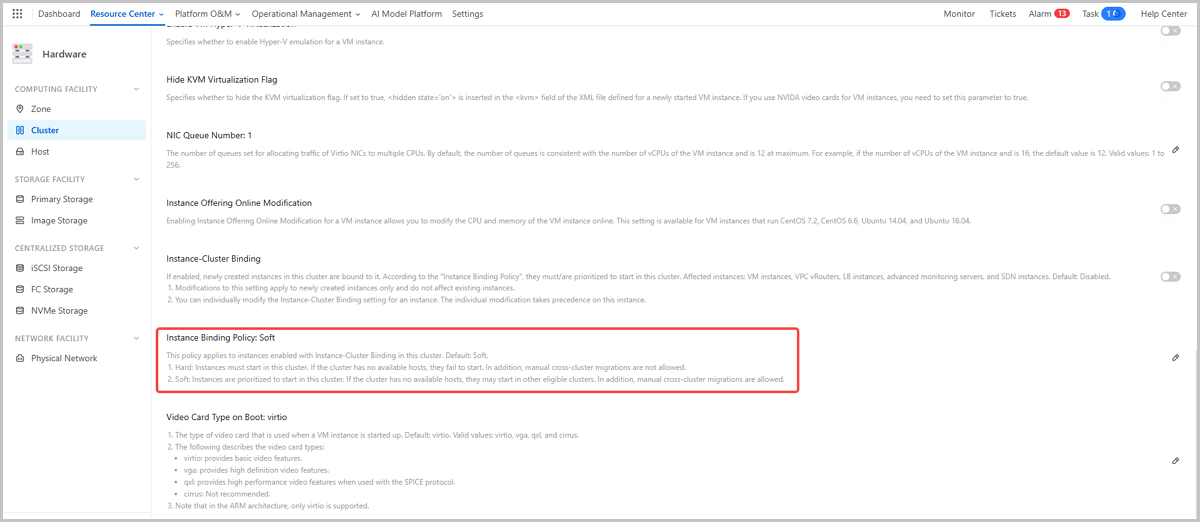
Figure 2. Cluster Setting: Instance Binding Policy


VNC Console Supports Full-Screen Mode and Small-Dot Cursor

Starting from ZStack Cloud 5.5.6, the VM instance VNC console supports full-screen display and small-dot cursor. This maximizes screen space utilization, eliminates visual distractions, and improves the experience for detailed console operations.


Download

Already filled the basic info?Click here.

Enter at least 2 characters.
Cannot be empty.
Invalid mobile number.
Enter at least 4 characters.
Invalid email address.
Wrong code. Try again. Send Code Resend Code (60s)

An email with a verification code will be sent to you. Make sure the address you provided is valid and correct.

同意 不同意

I have read and concur with the Site TermsPrivacy PolicyRules and Conventions on User Management of ZStack Cloud

Download

Not filled the basic info yet? Click here.

Invalid email address or mobile number.
同意 不同意

I have read and concur with the Site TermsPrivacy PolicyRules and Conventions on User Management of ZStack Cloud

Email Us

contact@zstack.io
ZStack Training and Certification
Enter at least 2 characters.
Invalid mobile number.
Enter at least 4 characters.
Invalid email address.
Wrong code. Try again. Send Code Resend Code (60s)

同意 不同意

I have read and concur with the Site TermsPrivacy PolicyRules and Conventions on User Management of ZStack Cloud

Email Us

contact@zstack.io
Request Trial
Enter at least 2 characters.
Invalid mobile number.
Enter at least 4 characters.
Invalid email address.
Wrong code. Try again. Send Code Resend Code (60s)

同意 不同意

I have read and concur with the Site TermsPrivacy PolicyRules and Conventions on User Management of ZStack Cloud

Email Us

contact@zstack.io

The download link is sent to your email address.

If you don't see it, check your spam folder, subscription folder, or AD folder. After receiving the email, click the URL to download the documentation.

The download link is sent to your email address.

If you don't see it, check your spam folder, subscription folder, or AD folder.
Or click on the URL below. (For Internet Explorer, right-click the URL and save it.)

Thank you for using ZStack products and services.

Submit successfully.

We'll connect soon.

Thank you for using ZStack products and services.