Fixed some issues。
{{currentItem.description}}
Release Date:{{currentItem.release_date}}
All
Prod Recommended Version
Technical Preview Version
Latest
{{item.year}}
{{iitem.product_version}}

ZStack Cloud 5.5.16

Highlights

  • Introduces DPU-Accelerated Elastic Baremetal Cluster: Uses DPU devices to directly deploy and manage baremetal nodes, reducing deployment difficulty and improving network and storage performance.
  • VM NIC Supports Individual Network Parameters: Supports configuring gateway, netmask, and DNS individually for VM NICs, enhancing network configuration flexibility.
  • Supports VPC vRouter SNAT Forwarding Traceability: After SNAT is enabled on a VPC vRouter, forwarding logs are recorded to support IP translation traceability, meeting network security compliance requirements.

Overview

Cloud Network
  1. Supports flexibly specifying VM NIC parameters.
  2. Supports VPC vRouter SNAT forwarding traceability.
Elastic Baremetal Management
  1. Introduces DPU-accelerated elastic baremetal cluster.
    • Supports 1:1 deployment and management of baremetal nodes through DPU devices.
    • Supports Ceph-based elastic baremetal instance creation and core operations.
Component Upgrade
  1. Python is upgraded to 3.11.
Performance Optimization
  1. Optimizes the database synchronization mechanism for dual management nodes.
  2. Optimizes the cloud platform upgrade experience.
  3. Optimizes the memory management mechanism of kvmagent.
Bug Fixes
  1. Stability: Fixes stability-related issues.
  2. Security: Fixes security bugs.

Supports Flexibly Specifying VM NIC Parameters

Starting from ZStack Cloud 5.5.16, you can flexibly specify IP address, gateway, subnet mask, and DNS for an individual NIC, further enhancing network configuration flexibility and adapting to more business scenarios.
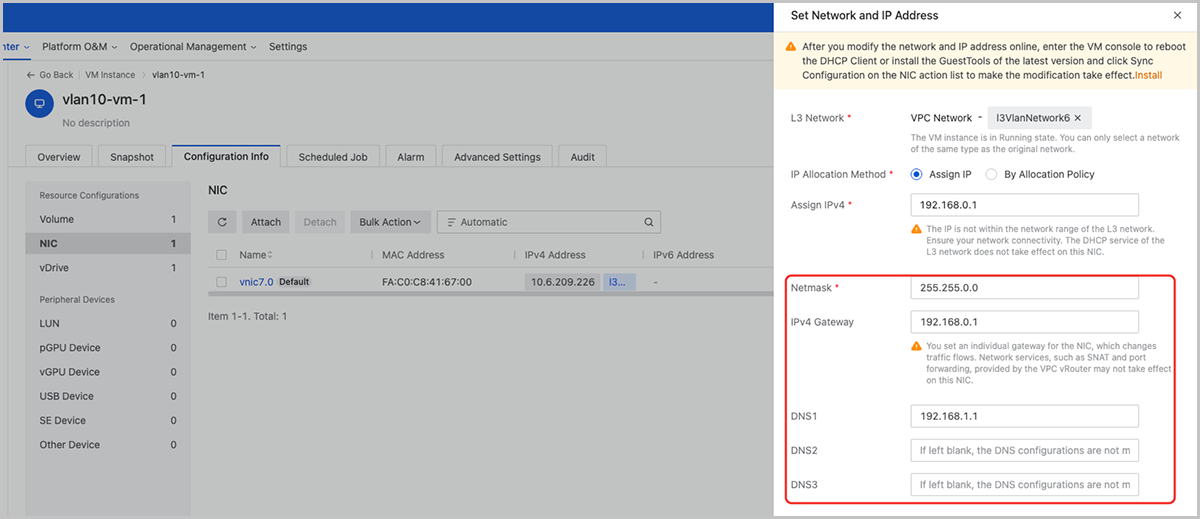
Figure 1. Specify Individual IP, Netmask, Gateway, and DNS for NIC


Supports VPC vRouter SNAT Forwarding Traceability

Starting from ZStack Cloud 5.5.16, after SNAT is enabled on a VPC vRouter, forwarding logs can be recorded to support IP forwarding traceability, further meeting network security compliance requirements.

To receive and view forwarding logs, add an SNAT log server and turn on the SNAT Log switch on the VPC vRouter details page.
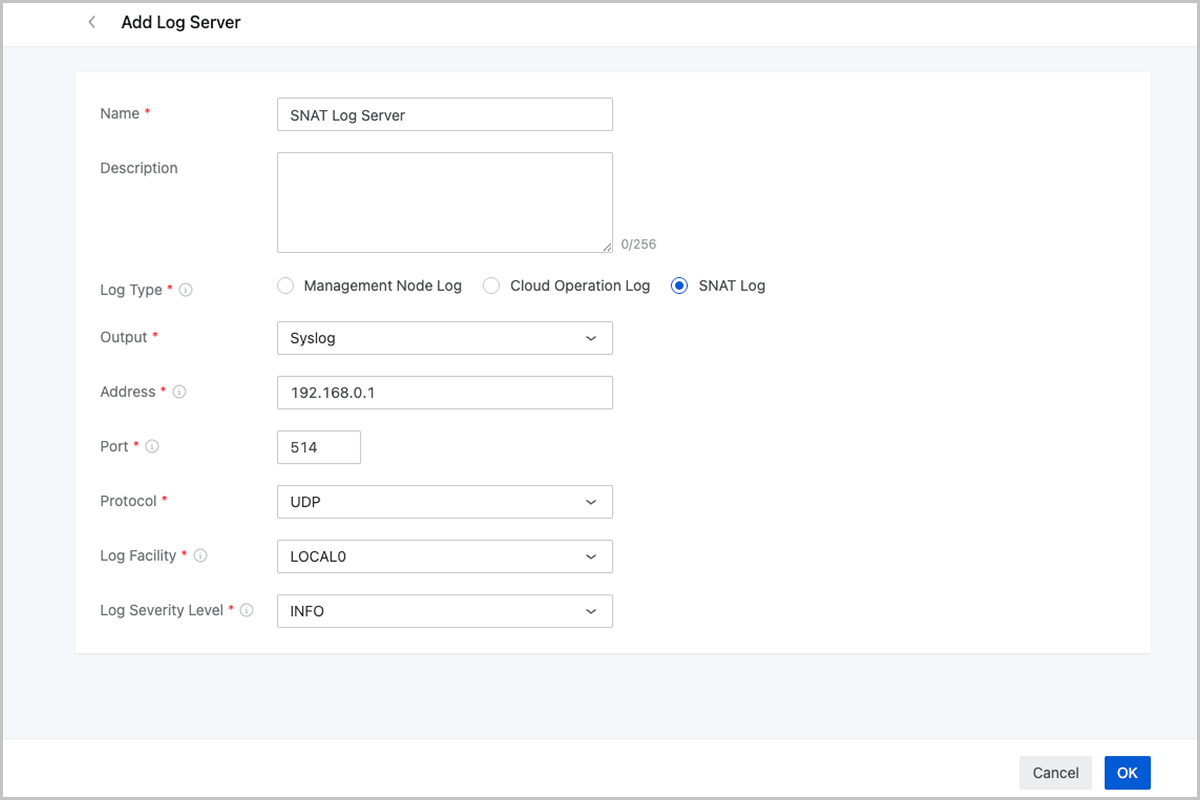
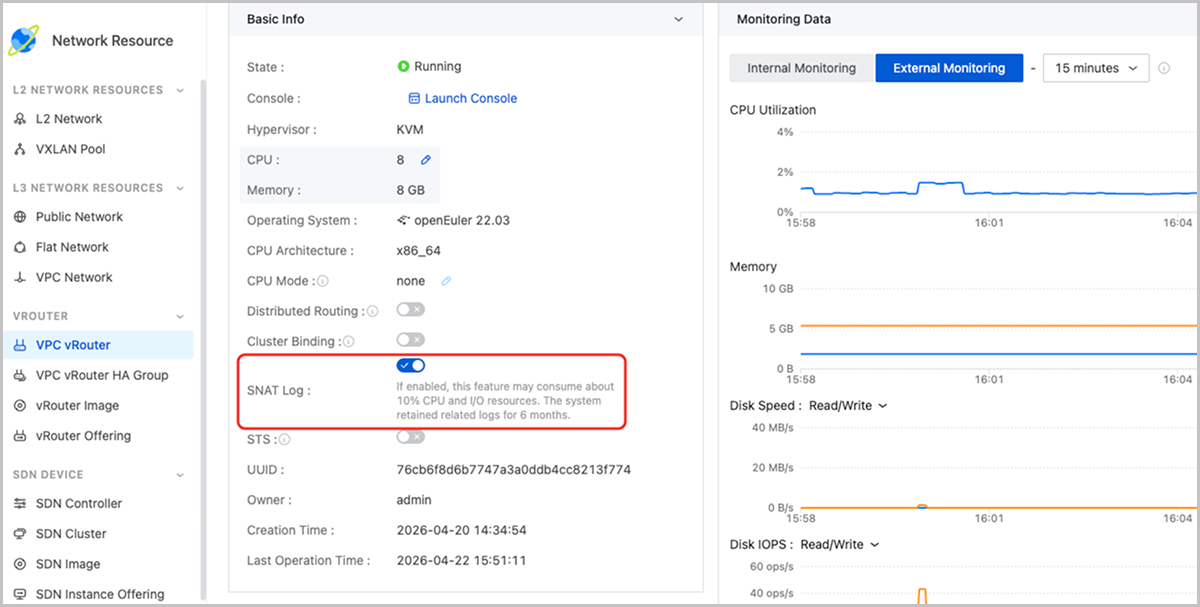
Figure 1. Add SNAT Log Server


Figure 2. Enable SNAT Log for VPC vRouter


Download

Already filled the basic info?Click here.

Enter at least 2 characters.
Cannot be empty.
Invalid mobile number.
Enter at least 4 characters.
Invalid email address.
Wrong code. Try again. Send Code Resend Code (60s)

An email with a verification code will be sent to you. Make sure the address you provided is valid and correct.

同意 不同意

I have read and concur with the Site TermsPrivacy PolicyRules and Conventions on User Management of ZStack Cloud

Download

Not filled the basic info yet? Click here.

Invalid email address or mobile number.
同意 不同意

I have read and concur with the Site TermsPrivacy PolicyRules and Conventions on User Management of ZStack Cloud

Email Us

contact@zstack.io
ZStack Training and Certification
Enter at least 2 characters.
Invalid mobile number.
Enter at least 4 characters.
Invalid email address.
Wrong code. Try again. Send Code Resend Code (60s)

同意 不同意

I have read and concur with the Site TermsPrivacy PolicyRules and Conventions on User Management of ZStack Cloud

Email Us

contact@zstack.io
Request Trial
Enter at least 2 characters.
Invalid mobile number.
Enter at least 4 characters.
Invalid email address.
Wrong code. Try again. Send Code Resend Code (60s)

同意 不同意

I have read and concur with the Site TermsPrivacy PolicyRules and Conventions on User Management of ZStack Cloud

Email Us

contact@zstack.io

The download link is sent to your email address.

If you don't see it, check your spam folder, subscription folder, or AD folder. After receiving the email, click the URL to download the documentation.

The download link is sent to your email address.

If you don't see it, check your spam folder, subscription folder, or AD folder.
Or click on the URL below. (For Internet Explorer, right-click the URL and save it.)

Thank you for using ZStack products and services.
Submit successfully.

We'll connect soon.

Thank you for using ZStack products and services.