ZStack ZSphere Installation


Hardware Requirements

The server configuration, including CPU, memory, storage capacity and NIC performance, determines the business capacity of ZStack ZSphere.
  • For demonstration environment: The server must have at least 4 CPU cores and 8 GB of memory.
  • For production environment:
    • Management node configuration: For small-scale scenarios, the server must have at least 8 CPU cores, 16 GB of memory, and 240 GB of storage.

      The actual hardware configuration requirements depend on your business scale. For details, contact official technical support.

    • Compute node configuration: The actual hardware configuration requirements depend on your business scale. For details, contact official technical support.

Recommended Hardware Configuration

The following table shows the recommended hardware configuration for servers in both demonstration and production environments.
Device Configuration
Server CPU
  • x86 architecture: 64-bit. Supports Intel VT-x or AMD-V hardware virtualization features (such as Intel VMX or AMD/Hygon SVM).
  • ARM architecture: 64-bit. Supports hardware virtualization features.
Memory No special requirements. DDR4 or higher specification memory is recommended.
Motherboard Standard dual-socket server motherboard.
RAID Controller Supports SAS/SATA RAID 0/1/10 and passthrough mode.
Disk No special requirements. Select HDD or SSD based on capacity and performance requirements.
Network Ports
  • Management port: 1 × 1 GbE RJ45
  • Business port: 1 × 10 GbE SFP+
Network Switch
  • At least one 1 GbE switch. 10 GbE switch is recommended.
  • Multiple Category 5 or higher network cables.

Hardware Planning

You need to plan your server resources according to your production needs. In a large data center with sufficient resources, we recommend deploying two servers as management nodes to control the entire virtualization platform. These two management nodes provide high availability. If one management node fails, the system automatically triggers a high availability switchover within seconds. This ensures the management service remains continuously available. In a small data center, you can use a single server as the management node.

The remaining servers act as compute nodes. In a large data center, you can select multiple compute nodes to act as image storage. This expands the total image storage capacity and improves throughput. In a small data center, the image storage can share a server with the management node.

Network Planning

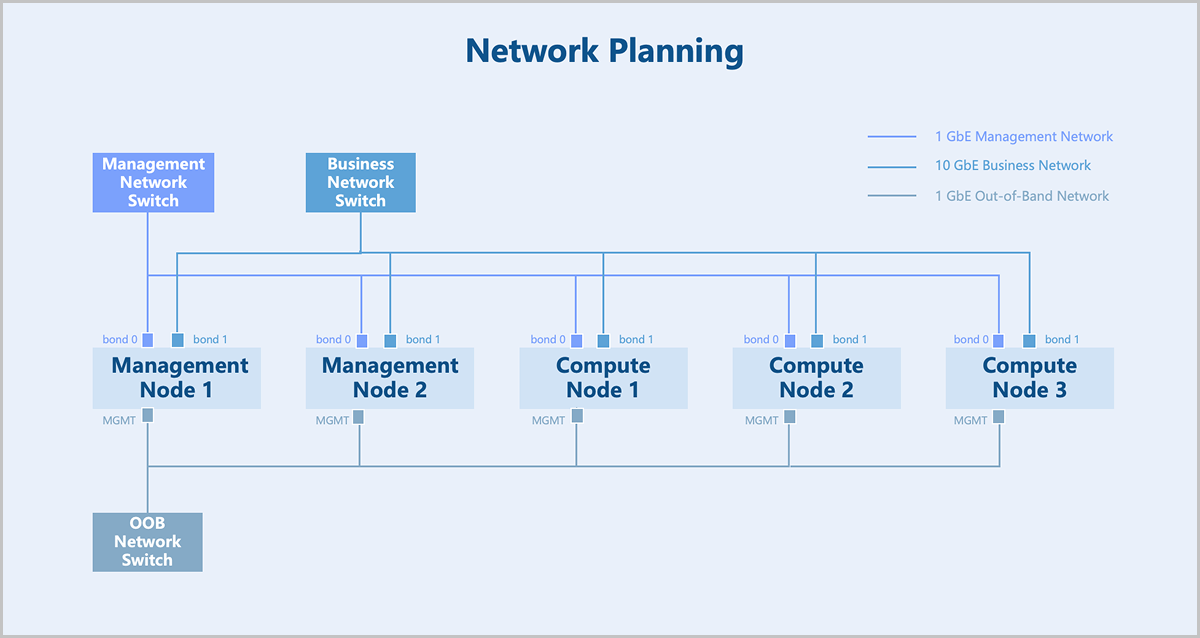
Figure 1 shows a typical data center that consists of several servers with different functions and two independent network environments.
Figure 1. Network Planning


  • The management network uses dual Gigabit networks for managing hardware resources related to the virtualization platform. The business network uses dual 10-Gigabit networks for virtual machine service traffic. You can configure network speeds based on your actual business requirements.
  • If you use network storage such as NFS or distributed storage, you need also plan an additional storage network to handle storage traffic.
  • We recommend that you maintain consistent NIC naming across all servers and use NICs with the same name to carry the same type of network traffic. For example, all management network traffic use the em1 NICs.
  • If you use a VLAN network, you need to configure the corresponding VLAN network communication on the switch in advance.
  • ZStack ZSphere automatically assigns IP addresses to virtual machines. You need to reserve an IP range that does not conflict with the system and ensure this range does not conflict with any existing DHCP services in your network environment.

Prepare Installation Packages

ZStack ZSphere ISO is built on Helix, a self-made virtualization kernel software that operates between the infrastructure layer and the upper-layer operating systems. It integrates essential components like hardware drivers, macro kernels, and virtual agents, shielding the differences among heterogeneous hardware. This releases operating systems from hardware driver dependencies, ensuring proper access to the heterogeneous hardware on the under layer. By doing so, Helix enhances hardware compatibility, high reliability, high availability, scalability, and performance of your virtual environment.

You can install ZStack ZSphere without connecting to the public network or configuring a yum source, allowing for a completely offline installation.

The following table shows the software packages used for installing ZStack ZSphere.
Sever Architecture Package Name
x86 ZStack-ZSphere-x86_64-DVD-4.10.20-H84r.iso
ZStack-ZSphere-x86_64-DVD-4.10.20-KylinV10SP3.iso
ARM ZStack-ZSphere-aarch64-DVD-4.10.20-H22e.iso
ZStack-ZSphere-aarch64-DVD-4.10.20-KylinV10SP3.iso
Note: After obtaining the software package, use an MD5 checksum tool to verify the checksum and ensure the software is complete and intact.


Archives

Download Document Archives

Download

Already filled the basic info?Click here.

Enter at least 2 characters.
Cannot be empty.
Invalid mobile number.
Enter at least 4 characters.
Invalid email address.
Wrong code. Try again. Send Code Resend Code (60s)

An email with a verification code will be sent to you. Make sure the address you provided is valid and correct.

同意 不同意

I have read and concur with the Site TermsPrivacy PolicyRules and Conventions on User Management of ZStack Cloud

Download

Not filled the basic info yet? Click here.

Invalid email address or mobile number.
同意 不同意

I have read and concur with the Site TermsPrivacy PolicyRules and Conventions on User Management of ZStack Cloud

Email Us

contact@zstack.io
ZStack Training and Certification
Enter at least 2 characters.
Invalid mobile number.
Enter at least 4 characters.
Invalid email address.
Wrong code. Try again. Send Code Resend Code (60s)

同意 不同意

I have read and concur with the Site TermsPrivacy PolicyRules and Conventions on User Management of ZStack Cloud

Email Us

contact@zstack.io
Request Trial
Enter at least 2 characters.
Invalid mobile number.
Enter at least 4 characters.
Invalid email address.
Wrong code. Try again. Send Code Resend Code (60s)

同意 不同意

I have read and concur with the Site TermsPrivacy PolicyRules and Conventions on User Management of ZStack Cloud

Email Us

contact@zstack.io

The download link is sent to your email address.

If you don't see it, check your spam folder, subscription folder, or AD folder. After receiving the email, click the URL to download the documentation.

The download link is sent to your email address.

If you don't see it, check your spam folder, subscription folder, or AD folder.
Or click on the URL below. (For Internet Explorer, right-click the URL and save it.)

Thank you for using ZStack products and services.

Submit successfully.

We'll connect soon.

Thank you for using ZStack products and services.