Fixed some issues。
{{currentItem.description}}
Release Date:{{currentItem.release_date}}
All
Prod Recommended Version
Technical Preview Version
Latest
{{item.year}}
{{iitem.product_version}}

Supports SDN Instance HA

Starting from ZStack Cloud 5.5.0, the SDN module introduces a new resource type: the SDN cluster. An SDN cluster is a group of dedicated VM instances designed to provide highly available SDN capabilities.
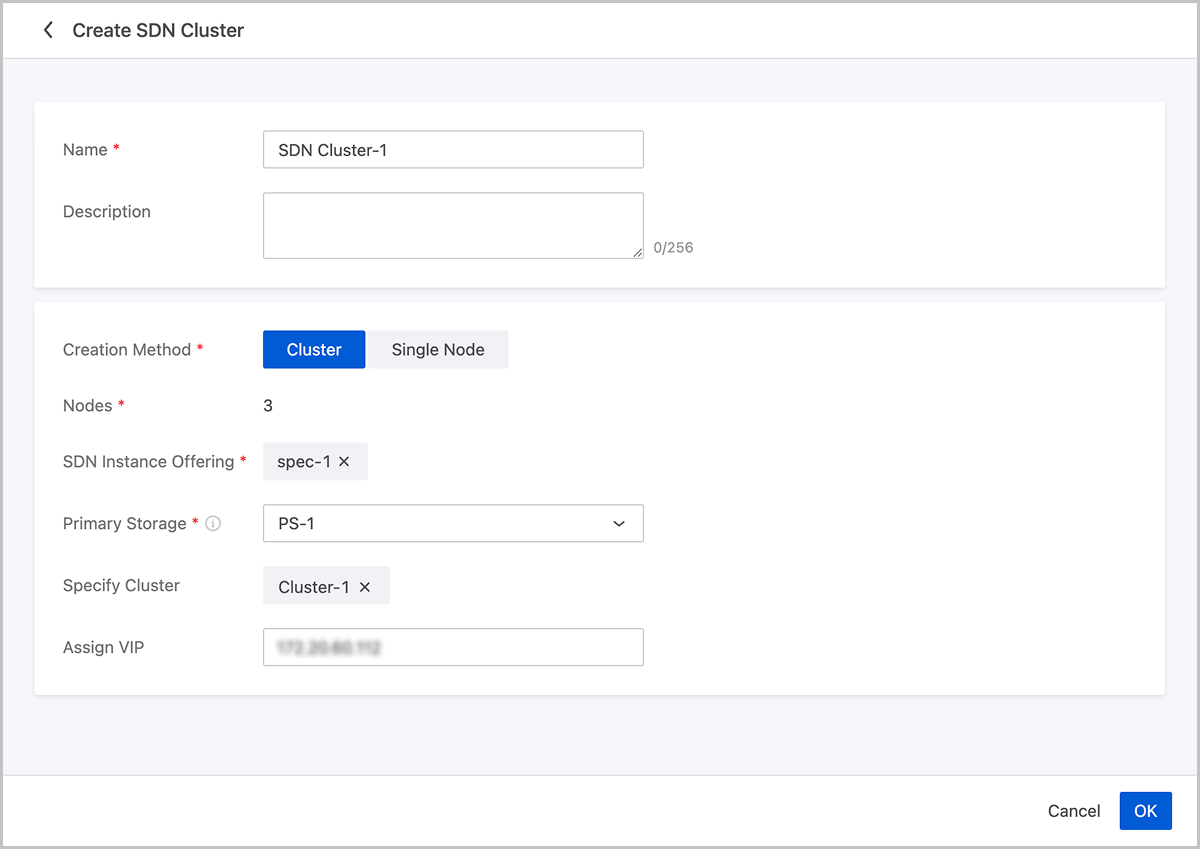
Flexible Deployment Modes

When creating an SDN cluster, you can choose one of the following deployment modes based on business requirements:
  1. Cluster Mode (Recommended for production environments)
    • The system automatically creates an SDN cluster containing 3 nodes.
    • All nodes in the cluster have the same instance offering and are deployed on the same primary storage.
    • The system uses an anti-affinity policy to ensure the 3 nodes are scheduled to run on different hosts, effectively preventing network function anomalies caused by host failures.
  2. Single-Node Mode (Suitable for development, testing, or lightweight environments)
    • The system creates a single-node SDN instance, whose behavior is identical to the legacy SDN Instance.

Enhanced Monitoring and Operations

  • Supports visualization and monitoring of the SDN cluster as a whole and its internal nodes. You can intuitively view the health status of the cluster and nodes, facilitating rapid fault identification by operations staff.
  • A new SDN cluster maintenance mode is added. In maintenance mode, you can perform operations such as adding, rebooting, or deleting instances within the cluster.
Figure 1. Create SDN Cluster


Dual-NIC Bond Support for SR-IOV Virtualization and Restoration

Starting from ZStack Cloud 5.5.0, SR-IOV is supported on dual-NIC bonds. You can configure VF NICs based on dual-NIC bonds for VPC vRouters, thereby achieving both the network performance of hardware passthrough and high availability.

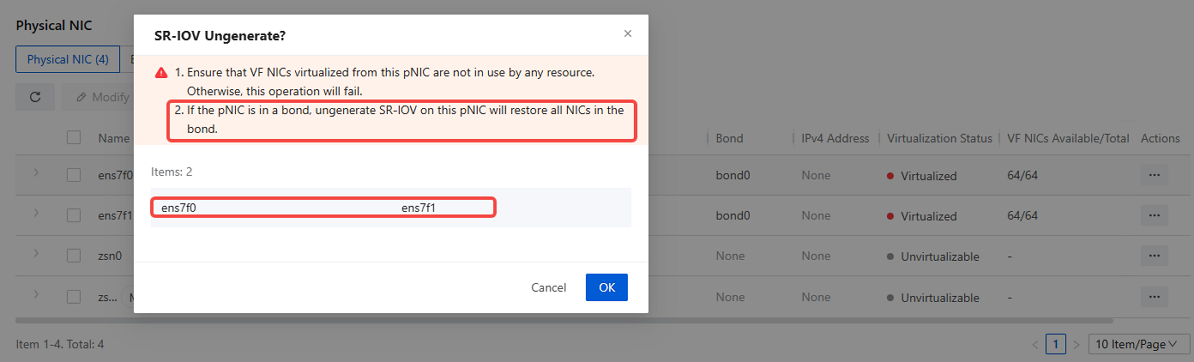
Support for SR-IOV Virtualization and Restoration on Dual-NIC Bonds

When physical NICs are added to a bond and the number of NICs in the bond does not exceed two, you can perform SR-IOV virtualization on the NICs. When you virtualize or restore the physical NIC, all physical NICs in the bond will be virtualized or restored.
Figure 1. Bond SR-IOV Virtualization


Figure 2. Bond SR-IOV Restoration


VPC vRouter Support for NIC Traffic Visualization and Monitoring

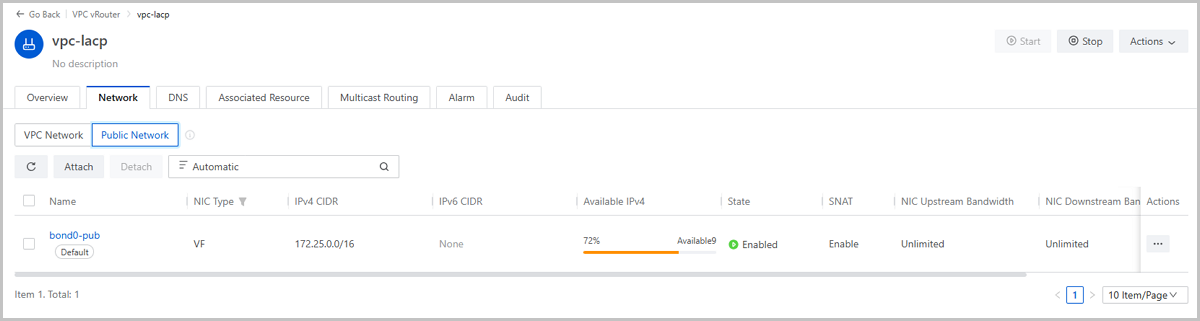
When creating a VPC vRouter, using a bonded network with SR-IOV enabled provides both the low latency and high throughput of hardware passthrough and the redundancy mechanism provided by bonding. This meets the dual requirements of being both fast and stable for core production business networks.
Figure 3. Attach Bond Network to VPC vRouter and Enable SR-IOV


VPC vRouters Support for NIC Traffic Visualization and Monitoring

ZStack Cloud5.5.0 adds NIC traffic statistics to the internal monitoring of VPC vRouters, including the following metrics:
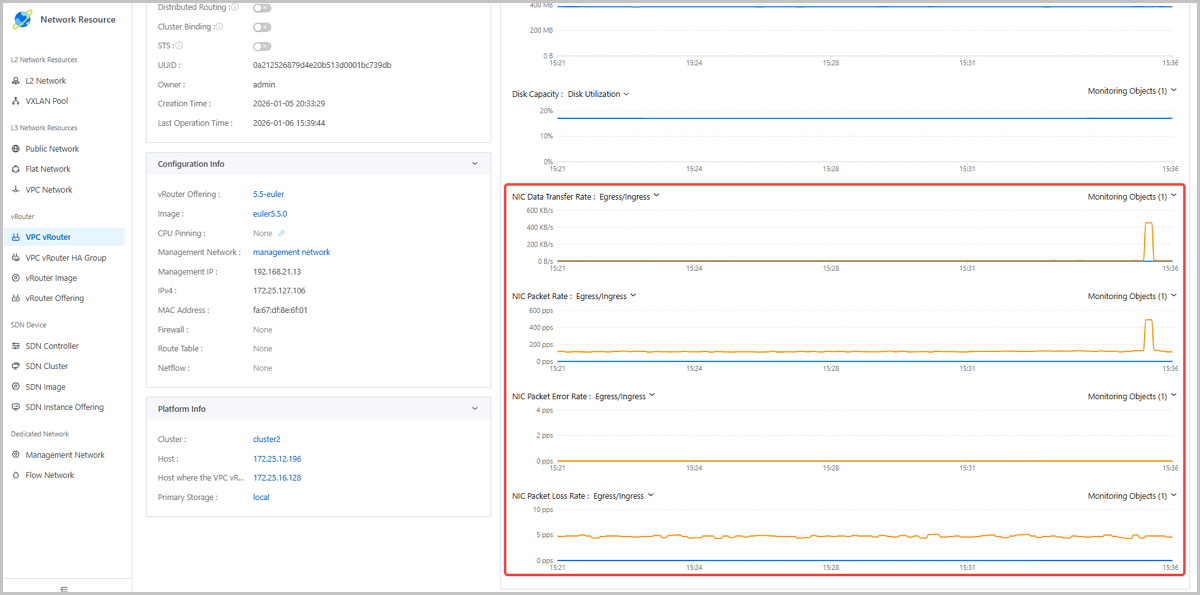
  • VRouterNetworkInBytes
  • VRouterNetworkAllInBytes
  • VRouterNetworkInPackets
  • VRouterNetworkAllInPackets
  • VRouterNetworkInErrors
  • VRouterNetworkAllInErrors
  • VRouterNetworkInDroppedBytes
  • VRouterNetworkAllInDroppedBytes
  • VRouterNetworkOutBytes
  • VRouterNetworkAllOutBytes
  • VRouterNetworkOutPackets
  • VRouterNetworkAllOutPackets
  • VRouterNetworkOutErrors
  • VRouterNetworkAllOutErrors
  • VRouterNetworkOutDroppedBytes
  • VRouterNetworkAllOutDroppedBytes
Figure 1. VPC vRouter NIC Visual Monitoring


Download

Already filled the basic info?Click here.

Enter at least 2 characters.
Cannot be empty.
Invalid mobile number.
Enter at least 4 characters.
Invalid email address.
Wrong code. Try again. Send Code Resend Code (60s)

An email with a verification code will be sent to you. Make sure the address you provided is valid and correct.

同意 不同意

I have read and concur with the Site TermsPrivacy PolicyRules and Conventions on User Management of ZStack Cloud

Download

Not filled the basic info yet? Click here.

Invalid email address or mobile number.
同意 不同意

I have read and concur with the Site TermsPrivacy PolicyRules and Conventions on User Management of ZStack Cloud

Email Us

contact@zstack.io
ZStack Training and Certification
Enter at least 2 characters.
Invalid mobile number.
Enter at least 4 characters.
Invalid email address.
Wrong code. Try again. Send Code Resend Code (60s)

同意 不同意

I have read and concur with the Site TermsPrivacy PolicyRules and Conventions on User Management of ZStack Cloud

Email Us

contact@zstack.io
Request Trial
Enter at least 2 characters.
Invalid mobile number.
Enter at least 4 characters.
Invalid email address.
Wrong code. Try again. Send Code Resend Code (60s)

同意 不同意

I have read and concur with the Site TermsPrivacy PolicyRules and Conventions on User Management of ZStack Cloud

Email Us

contact@zstack.io

The download link is sent to your email address.

If you don't see it, check your spam folder, subscription folder, or AD folder. After receiving the email, click the URL to download the documentation.

The download link is sent to your email address.

If you don't see it, check your spam folder, subscription folder, or AD folder.
Or click on the URL below. (For Internet Explorer, right-click the URL and save it.)

Thank you for using ZStack products and services.

Submit successfully.

We'll connect soon.

Thank you for using ZStack products and services.