


ZStack Cloud Platform
Single Server, Free Trial for One Year

Comprehensive product documentation and tools

Upholding the value of Customer First and the mission of Serving Customer, ZStack is dedicated to providing secure and stable services for customers.

To educate ZStack partners and interested individuals about cloud computing and to cultivate cloud computing talent.

ZStack provides innovative cloud infrastructure for ten major industries

The report provides three major
solutions and customer case studies for transitioning from VMware to ZStack.
This section introduces QCOW2 external snapshots.
Typically, a single disk corresponds to one snapshot chain. ZStack Cloud supports creating a snapshot tree for a disk, where each branch of the tree represents a distinct snapshot chain.

 Note:
Note: When an external snapshot is created, a new empty QCOW2 file is generated. This new file has its backing file pointed to the original QCOW2 file. The original QCOW2 file is set to read-only, effectively turning it into a snapshot itself. Subsequent data writes are directed only to the new QCOW2 file. The creation of an external snapshot involves creating a new blank qcow2 file.

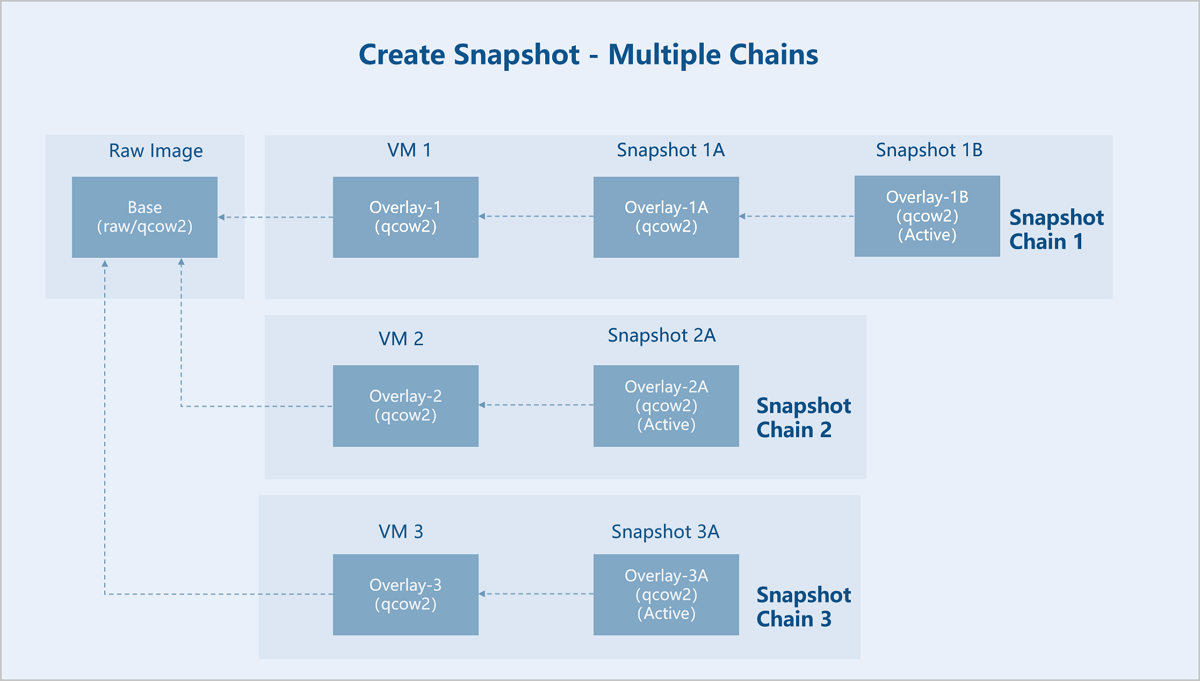
External snapshots are interdependent, where each overlay file depends on its backing file. Each snapshot preserves its corresponding data, preventing the direct deletion of an individual snapshot to shorten the chain length. The chain length of external snapshots can be reduced through two methods: downward merging (Blockcommit) or upward merging (Blockpull).
Within the same snapshot chain, you can merge overlays to backing files.

Assume there is an original base image (Base). VM instance 1 is created based on Base, and three interdependent external snapshots are created for VM instance 1: Snapshot 1A, Snapshot 1B, and Snapshot 1C. Now, Snapshot 1A and Snapshot 1B are merged downward into VM instance 1. As a result, the backing file of Snapshot 1C (Active) points directly to VM instance 1, so the snapshot chain is shortened. Snapshots 1A and 1B are no longer useful and can be deleted.
Within the same snapshot chain, you can merge backing files to overlays.
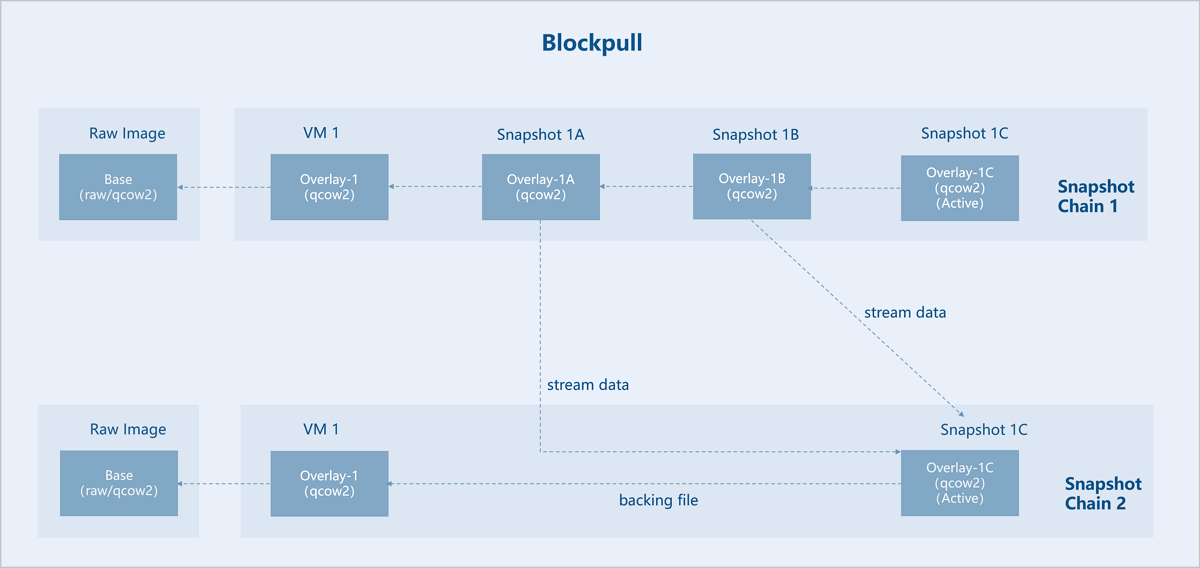
Assume there is an original base image (Base). VM instance 1 is created based on Base, and three interdependent external snapshots are created for VM instance 1: Snapshot 1A, Snapshot 1B, and Snapshot 1C. Now, Snapshot 1A and Snapshot 1B are merged upward into Snapshot 1C (Active). As a result, the backing file of Snapshot 1C (Active) points directly to VM instance 1, so the snapshot chain is shortened. Snapshots 1A and 1B are no longer useful and can be deleted.
Ceph enterprise edition uses ROW snapshot technology. Self-developed distributed storage uses COW snapshots. For more information, see Volume Snapshot Protection.
The backup service supports data backup based on the QEMU block device layer. VM instances on all types of primary storage support backup operations. Backup types include full backup and incremental backup. A full backup contains a complete data set, while an incremental backup contains only the data updated since the last backup. Both full and incremental backups only backup actual used data.
By default, the backup policy is configured to automatically perform a full backup after every 63 incremental backups, starting after the initial full backup. Due to the dependencies between incremental backups, a new full backup must be created before previous incremental backups can be deleted. In practice, the system employs more intelligent and flexible strategies to determine the appropriate backup method, ensuring the safety and reliability of the backup data.
The data backup process consists of three parts: data replication, data transfer, and data storage.


