CloudFormation

CloudFormation: CloudFormation is a service that simplifies the management of cloud resources and automates deployment and O&S. You can create a stack template to configure cloud resources and their dependencies. This way, resources can be automatically configured and deployed in batches. CloudFormation provides easy management of the lifecycle of cloud resources and integrates automatic O&S into API and SDK.
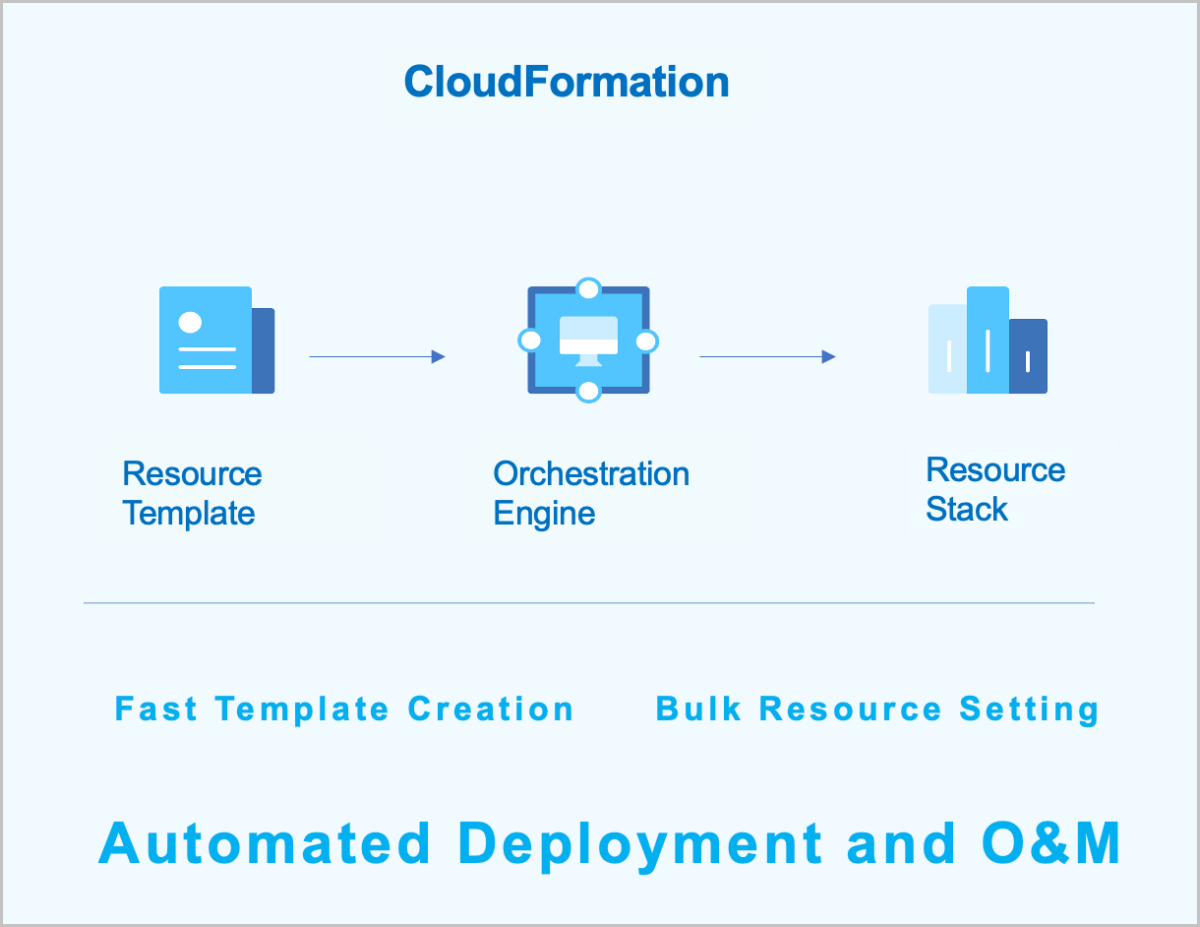
Figure 1. CloudFormation


Characteristics

  • You can create a new resource stack or modify an existing one to define the required cloud resources, their dependencies, and configurations. The CloudFormation will then automatically create and configure all resources through its orchestration engine.
  • ZStack Cloud provides sample templates and a designer to help you create resource stack templates quickly.
  • You can dynamically modify the resource stack template based on business requirements, allowing the resource stack to adapt flexibly to evolving needs.
  • If a resource stack is no longer required, you can delete the entire stack and all its contained resources with a single click.
  • You can reuse existing stack templates to quickly duplicate complete sets of resources, eliminating the need for repetitive configuration.
  • You can flexibly combine various cloud services based on different scenarios to meet the needs of automatic maintenance.

Management Node Monitoring

In a dual-management node HA scenario, you can intuitively view the health status of each management node.

The management node monitoring supports displaying the management node IP, node status, VIP, and management service status for multiple management nodes. The main management services include:
  • Monitor IP reachability: Monitors whether the monitor IP for determining the reachability of the primary and standby management nodes is reachable. If unreachable, the management node high availability function may fail.
  • Peer management node reachability: Monitors whether the standby management node is reachable. If the standby management node is unreachable, communication with it cannot be established.
  • VIP reachability: Monitors whether the VIP is reachable. If the VIP is unreachable, the primary management node cannot be accessed via the VIP through the UI interface.
  • Database status: Monitors the database status. If the database is abnormal or the databases on the dual management nodes are out of sync, there may be a risk of data loss. Restore normal operation promptly.
Figure 1. Management Node Monitoring

Monitoring and Alarm

Monitoring and alarm supports monitoring time-series data (such as resource load and capacity data) and predefined system events. It pushes alarms to specified endpoints through the SNS. The supported alarm types include resource alarm, event alarm, and extended alarm. Supported endpoint types include system, email, DingTalk, WeCom, Lark, Webhook, SMS, Microsoft Teams, and SNMP Trap. Some resource alarms require an installed agent to function.

Figure 1. Monitoring and Alarm Framework


Prometheus provides time-series monitoring data. When monitoring business data, Prometheus uniformly collects different data.

In the Prometheus architecture, the Prometheus server does not directly monitor specific targets. Its core functions are data collection, storage, and providing external data query support. Therefore, to acquire sample data, such as the host CPU usage, an Exporter is used to periodically gather monitoring samples. ZStack Cloud employs both pull and push modes to collect monitoring data from different monitoring targets. When hosts or external VM metrics are the monitoring targets, the Prometheus service periodically uses the pull mode to collect data gathered by the Exporter on the hosts.

Additionally, due to network or security constraints, Prometheus might not be able to directly access the interiors of cloud VMs or bare metal servers. In such cases, a Pushgateway acts as an intermediary to facilitate data transfer. The data collection agent still uses an Exporter to gather monitoring metrics but employs a push mode to periodically send this data to the Pushgateway. Prometheus then uses its pull mode to collect the data from the Pushgateway, thereby achieving unified data collection.


Archives

Download Document Archives

Download

Already filled the basic info?Click here.

Enter at least 2 characters.
Cannot be empty.
Invalid mobile number.
Enter at least 4 characters.
Invalid email address.
Wrong code. Try again. Send Code Resend Code (60s)

An email with a verification code will be sent to you. Make sure the address you provided is valid and correct.

同意 不同意

I have read and concur with the Site TermsPrivacy PolicyRules and Conventions on User Management of ZStack Cloud

Download

Not filled the basic info yet? Click here.

Invalid email address or mobile number.
同意 不同意

I have read and concur with the Site TermsPrivacy PolicyRules and Conventions on User Management of ZStack Cloud

Email Us

contact@zstack.io
ZStack Training and Certification
Enter at least 2 characters.
Invalid mobile number.
Enter at least 4 characters.
Invalid email address.
Wrong code. Try again. Send Code Resend Code (60s)

同意 不同意

I have read and concur with the Site TermsPrivacy PolicyRules and Conventions on User Management of ZStack Cloud

Email Us

contact@zstack.io
Request Trial
Enter at least 2 characters.
Invalid mobile number.
Enter at least 4 characters.
Invalid email address.
Wrong code. Try again. Send Code Resend Code (60s)

同意 不同意

I have read and concur with the Site TermsPrivacy PolicyRules and Conventions on User Management of ZStack Cloud

Email Us

contact@zstack.io

The download link is sent to your email address.

If you don't see it, check your spam folder, subscription folder, or AD folder. After receiving the email, click the URL to download the documentation.

The download link is sent to your email address.

If you don't see it, check your spam folder, subscription folder, or AD folder.
Or click on the URL below. (For Internet Explorer, right-click the URL and save it.)

Thank you for using ZStack products and services.

Submit successfully.

We'll connect soon.

Thank you for using ZStack products and services.